Planning Multi-Stop Freight Routes Within HOS Limits

Quick answer: A multi-stop run from the Midwest to the Southeast works only if you plan backward from the driver's 11-hour driving limit and 14-hour on-duty window, not forward from your delivery wishlist. Build each leg using real drive times between hubs like Chicago, Louisville, Atlanta, and Memphis, add buffer for loading and detention, and schedule the mandatory 10-hour break before the clock forces it. Shippers who skip this step end up with late deliveries, detention charges, and drivers stuck mid-route with no legal hours left to finish the job.
Key takeaways
- Federal rules set an 11-hour driving limit inside a 14-hour on-duty window, and the Federal Motor Carrier Safety Administration requires a 10-consecutive-hour break before that window resets, per FMCSA's hours-of-service regulations.
- Chicago to Atlanta is roughly 720 miles — too far for one 11-hour driving day once loading, fueling, and traffic are factored in, so it typically requires a reset along the way.
- Every hour a driver waits at a dock to load or unload eats directly into the 14-hour window, whether or not the truck ever moves.
- Multi-stop routes that aren't planned around HOS limits tend to fail at the last stop first, because that's where the shrinking clock catches up with the schedule.
!Planning Multi-Stop Freight Routes Within HOS Limits
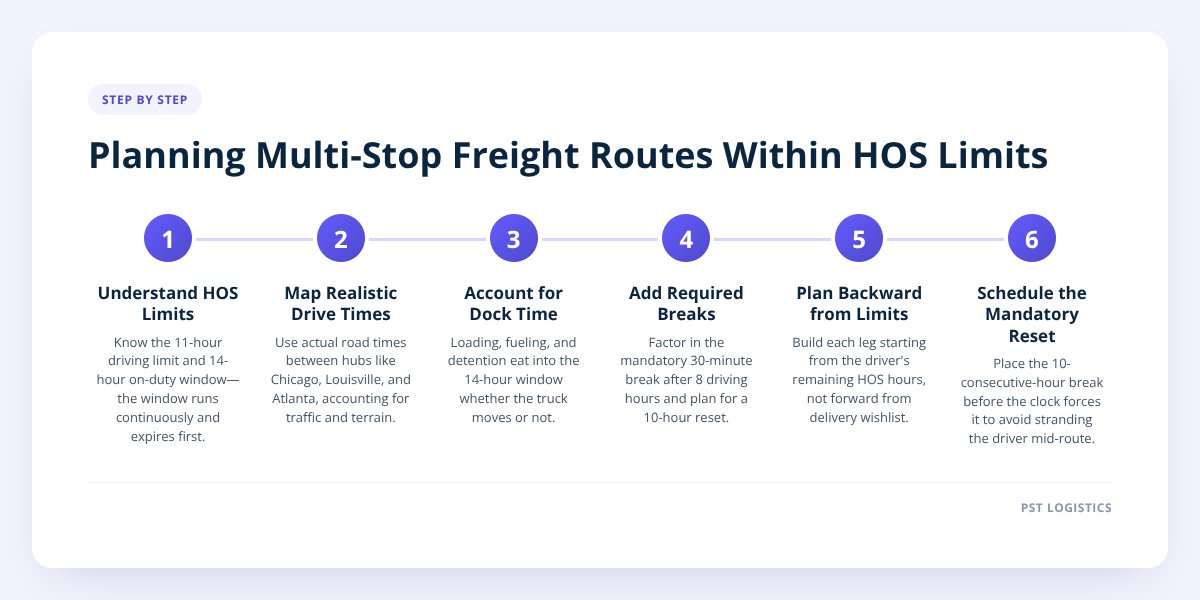
Why Multi-Stop Routes Fail: Common HOS Miscalculations
Most multi-stop routes fail because the person building the schedule plans around mileage and delivery dates, not around the driver's clock. A dispatcher or shipper looks at a map, sees 1,100 miles from Chicago to Atlanta with two stops in between, and assumes two driving days will cover it. On paper that looks fine. On the road, it rarely survives contact with a loading dock.
The math breaks down because the 14-hour on-duty window doesn't pause for anything. Once a driver clocks on duty, that 14-hour clock runs continuously — through loading, fueling, traffic, weather delays, and waiting at a receiver — whether the truck is moving or not. A driver only gets 11 of those 14 hours to actually drive, per the Federal Motor Carrier Safety Administration's hours-of-service rules.
Here's where shippers typically miscalculate:
- Treating loading time as free. A two-hour wait at the first pickup doesn't extend the day — it just burns two hours of the 14 available, leaving less time to drive.
- Assuming highway speed for the whole trip. Google Maps drive-time estimates don't account for mandatory breaks, construction, or urban congestion around Chicago, Atlanta, or Memphis.
- Stacking too many stops into one day. Each additional stop adds dock time, and dock time is the single most common reason a route that looked fine on a spreadsheet runs out of hours on the road.
- Ignoring the 30-minute break requirement. FMCSA requires a 30-minute break after 8 cumulative hours of driving, which adds time to the day even when the truck never fully stops moving for long.
The cost isn't abstract. A missed delivery appointment because the driver ran out of legal hours 40 miles short of the receiver often means a rescheduled appointment, a detention dispute, and an unhappy customer at the end of the chain — all because the original schedule assumed the truck could drive straight through. We covered the broader version of this problem in How FMCSA Hours-of-Service Rules Affect Freight Delivery, but multi-stop runs compound the risk because every added stop is another place for the plan to break.
Step 1: Know the Two Limits That Actually Constrain Your Route
The two numbers that matter most are the 11-hour driving limit and the 14-hour on-duty window, and they don't work the same way. The 11-hour driving limit caps how long a driver can be behind the wheel after 10 consecutive hours off duty. The 14-hour on-duty window caps the total span of the workday — driving plus everything else — and it starts the moment the driver goes on duty, not the moment the wheels start turning.
That distinction matters for multi-stop planning because the 14-hour window is the one that usually runs out first. A driver who spends 3 hours waiting at a pickup, then drives for 7 hours, has used 10 of the 14 hours but only 7 of the 11 driving hours. There's driving time left on paper, but only 4 hours of window left to use it — and that window won't stretch for a late appointment or a backed-up receiver.
Once the 14-hour window closes, the driver must take a 10-consecutive-hour break before driving again, regardless of how many driving hours remain unused, according to FMCSA's hours-of-service framework. That's the rule that turns an optimistic two-day plan into a three-day reality.
Don't skip this: Build every multi-stop schedule around the 14-hour on-duty window, not the 11-hour driving limit. Detention time, fuel stops, and dock delays all count against the 14 hours even when the truck isn't moving, and that window is almost always the first one to run out.
Step 2: Map Realistic Drive Times Between Midwest and Southeast Hubs
Plan each leg using actual road time between hubs, not straight-line mileage, because terrain, traffic, and weigh stations change the math. These are general planning ranges for a loaded dry van truck obeying speed limits and HOS rules — always confirm against current routing and traffic before committing to an appointment window.
| Route | Approximate Distance | Realistic Drive Time | HOS Notes |
|---|---|---|---|
| Chicago, IL → Louisville, KY | ~295 miles | 5–6 hours | Fits inside one driving window with room for a stop |
| Louisville, KY → Atlanta, GA | ~410 miles | 7–8 hours | Pushes close to the 11-hour limit once traffic and fuel are added |
| Chicago, IL → Memphis, TN | ~530 miles | 9–10 hours | Leaves little room for a stop without a reset |
| Memphis, TN → Atlanta, GA | ~380 miles | 6–7 hours | Comfortable single-day leg if the driver starts fresh |
| Chicago, IL → Atlanta, GA (direct) | ~715 miles | 12–13 hours of driving | Cannot be done in one 11-hour driving day; requires a break |
The pattern that matters: any single leg over roughly 500–550 miles is tight to finish in one driving day once a driver accounts for the 30-minute break, fuel stops, and getting in and out of a dock. Anything over 650 miles almost certainly needs a split across two days with a 10-hour reset in between.
This is exactly why PST Global runs loads with one driver from pickup to final delivery, rather than handing freight off mid-route. A single driver who knows the lane can judge realistically where the clock will land by end of day — something that's much harder to coordinate across a relay of different drivers and carriers.
Step 3: Sequence Stops to Minimize Detention and Protect the Clock
Sequence multi-stop routes so the longest driving legs come early in the day and the most unpredictable dock sits later, because a driver with hours to spare can absorb a delay — a driver running low on hours can't. Putting a historically slow receiver as the first stop of the day, before detention risk is even known, wastes the freshest hours of the clock on unpredictable wait time.
A few sequencing principles that hold up across Midwest-to-Southeast lanes:
- Front-load the long haul. If one leg is 400+ miles and another is 150, drive the long leg first while the driver has a full clock, then handle shorter hops later.
- Group multi-stop deliveries by region, not by order received. Three drops scattered across greater Atlanta cost far less dock-to-dock time than three drops spread between Atlanta, Memphis, and Louisville on the same day.
- Build in a detention buffer at known slow docks. If a receiver has a history of two-hour waits, plan that stop early in the window, not at hour 12.
- Avoid scheduling a tight delivery appointment right after a long drive leg. If the drive itself eats 9 of the 11 driving hours, there's no cushion left for a receiver running behind.
We go deeper into detention specifically in How to Avoid Detention Fees on Interstate Freight Runs, but the short version for multi-stop planning is this: detention doesn't just cost money, it costs hours the driver can't get back that day.
Step 4: Negotiate Appointment Windows That Match the Driver's Real Clock
Negotiate appointment windows based on when the truck can legally arrive, not when the receiver's dock schedule prefers. A receiver who insists on a hard 7 a.m. slot after a 500-mile overnight leg is asking for a delivery that may not be legally possible if the driver hit the 14-hour window the evening before and needed a full 10-hour reset.
Shippers who get the best results treat the appointment conversation as a planning input, not a formality:
- Share the realistic drive-time math with the receiver up front, especially on legs over 400 miles.
- Ask for a window rather than a fixed hour when the route includes multiple stops before the final delivery.
- Flag known HOS constraints early — a receiver who knows a driver may need a reset the night before is far more likely to offer flexibility than one who finds out when the truck is late.
- Build the next day's appointment around where the driver's clock will actually reset, not where the map says the truck "should" be by morning.
This is the same conversation we walk through in Plan Freight on Tight Windows Without Driver Delays — tight windows aren't inherently a problem, but they only work when they're set with the driver's actual hours in mind rather than against them.
What to Do Next
A multi-stop route across the Midwest-to-Southeast corridor can run on time, but only if the schedule is built around the driver's clock from the start rather than patched together after a missed appointment. That means mapping real drive times between hubs, sequencing stops to protect the hours that are left, and negotiating appointment windows that reflect what's legally possible — not just what's convenient for the receiver.
PST Global runs dry van and temperature-controlled truckload freight across the Midwest-to-Southeast corridor, the Texas triangle, and I-80 westbound, with one driver assigned from pickup to final delivery and ELD-monitored hours of service on every unit. A 24/7 dispatcher who knows your lane can help build a multi-stop schedule that actually holds up against HOS limits instead of discovering the problem mid-route. Request a rate and talk through your route at joinpst.com/#quote.
Checklist: Planning a Multi-Stop Route Within HOS Limits
- Map each leg's distance between hubs and compare it against the 11-hour driving limit.
- Add realistic time for loading, fueling, and dock delays to each leg, not just drive time.
- Identify which legs exceed roughly 500–550 miles and plan a 10-hour reset around them.
- Sequence the longest drive leg early in the day while the driver's clock is freshest.
- Group deliveries by region to cut down on backtracking between stops.
- Flag any receiver with a history of slow unloading and schedule that stop with extra buffer.
- Share real drive-time estimates with receivers before locking in appointment windows.
- Confirm the carrier uses ELD-monitored hours of service so the plan matches what's legally trackable.